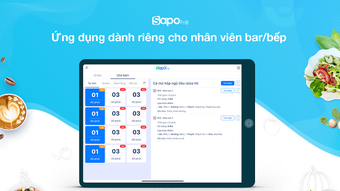

Download Sapo FnB – restaurant management, food service, order tracking, kitchen workflow, bar management, inventory control, menu management, table management, restaurant POS, digital ordering
Overview
Sapo FnB is a free Android application developed by SAPO TECHNOLOGY JSC, designed to streamline operations for restaurants, cafes, bars, and other food service businesses. The software serves as a comprehensive digital solution for managing the full spectrum of restaurant workflows, from order intake to kitchen preparation, bar service, and customer pickup. It enables staff to efficiently handle orders, manage tables, track inventory, and maintain up-to-date menus—all within a single, unified platform. The app is particularly useful for establishments seeking to reduce manual processes, minimize errors, and improve coordination between front-of-house and back-of-house teams.
By digitizing traditional workflows, Sapo FnB helps businesses save time and improve service speed. For example, when a waiter enters an order, it is instantly synchronized with kitchen and bar staff through a digital kitchen voucher, eliminating delays and miscommunication. The software supports dynamic order modifications, allowing staff to add or remove items based on real-time needs. It also facilitates table management and customer tracking, enabling better organization during peak hours. The app’s focus on simplicity and intuitive design makes it accessible to staff with varying levels of technical experience, ensuring quick onboarding and minimal training time.
Key Features & Capabilities
- Order Tracking and Synchronization – Orders placed by waiters are instantly sent to kitchen and bar staff via digital kitchen vouchers, ensuring real-time updates and reducing the risk of lost or delayed orders.
- Kitchen and Bar Workflow Management – The app supports end-to-end coordination between front-of-house and back-of-house teams, allowing for seamless preparation and service of dishes and beverages.
- Menu and Ingredient Management – Users can easily update menus and track ingredient usage, helping maintain consistency and support efficient inventory planning.
- Inventory Control – The system allows for monitoring stock levels, helping businesses prevent over-ordering and reduce waste through better ingredient tracking.
- Table and Customer Management – Staff can assign, modify, or remove tables and customers, supporting flexible seating arrangements and accurate order routing.
- Digital Ordering System – From order placement to pickup confirmation, the app manages the entire digital ordering lifecycle, improving accuracy and customer satisfaction.
These features collectively support a more organized and responsive service model. For instance, a bar manager can quickly adjust drink availability during a busy shift by updating the menu and syncing changes across devices. Similarly, a restaurant supervisor can monitor real-time inventory levels to anticipate restocking needs. The app’s modular design allows businesses to use only the components they need, making it scalable for small cafes or larger multi-location operations.
User Interface, Workflow & Performance
Sapo FnB features a simple and intuitive interface designed for quick adoption by restaurant staff. The layout prioritizes clarity and ease of navigation, with clearly labeled sections for orders, tables, menu, and inventory. Users can access key functions with minimal taps, reducing the learning curve and minimizing errors during high-pressure service periods.
The workflow is structured around real-time synchronization—when an order is entered, it appears immediately on kitchen and bar displays. This ensures that preparation teams are always working with the most current information. The app’s performance is optimized for mobile use, with smooth transitions between screens and responsive input handling. However, the developer did not specify resource usage details, so actual CPU or RAM behavior during extended use remains unknown.
Stability appears to be a core focus, as the app is designed to maintain consistent operation during peak hours. The absence of reported crashes or freezes in the provided information suggests reliable functionality. General software behavior patterns indicate that the app should perform adequately on modern Android devices, though specific performance benchmarks were not shared.
Compatibility & System Requirements
Sapo FnB is designed for Android devices and is available as a free download. The application has a file size of 15.2 MB, indicating a lightweight footprint suitable for most smartphones and tablets. It is compatible with Android operating systems, though the exact version requirements were not specified. The developer did not provide additional system requirements, so users should ensure their device meets general Android standards for app installation and operation.
Installation is straightforward, with no reported complications. The app does not require administrative privileges or external dependencies. Since the software is tailored for mobile use in restaurant environments, it is likely optimized for touch-based interaction and screen sizes typical of handheld devices used in service settings.
Pros and Cons
Pros
- Free to download and use, reducing initial operational costs
- Intuitive interface designed for non-technical staff
- Real-time order synchronization between front and back of house
- Comprehensive tools for menu, inventory, and table management
- Supports end-to-end digital ordering workflow
- Lightweight at 15.2 MB, suitable for older Android devices
Cons
- Platform limited to Android; no support for iOS or desktop
- Exact system requirements and OS version compatibility not specified
- No information on cloud backup or data security protocols
- Offline functionality details not provided
- Performance under heavy load or multi-user scenarios not documented
FAQ Section
Is Sapo FnB available for iOS devices?
Currently, Sapo FnB is only available for Android. The developer did not indicate plans for an iOS version.
Can I use Sapo FnB without an internet connection?
The app’s offline capabilities were not specified. It likely requires internet connectivity for real-time synchronization between devices.
Is the app secure for storing customer and order data?
Security measures were not detailed. Users should ensure their devices are protected with standard security practices.
How often are updates released?
Update frequency was not disclosed. The app’s current version is 1.0.0, released on October 15, 2023.
What kind of license does Sapo FnB use?
Sapo FnB is free to download and use. No licensing model was specified beyond the free access.
Final Thoughts + CTA
Sapo FnB presents a practical, cost-effective solution for food service businesses seeking to digitize their operations. With its focus on real-time order tracking, kitchen workflow coordination, and inventory control, it addresses core pain points in restaurant management. The app’s intuitive design and lightweight nature make it accessible to staff with minimal training, while its comprehensive feature set supports scalable use across different business sizes.
While the lack of information on system requirements, security, and offline functionality limits deeper evaluation, the app’s core functionality is clearly aligned with the needs of modern restaurants and cafes. For businesses operating on Android devices and looking for a free, all-in-one tool to manage orders, menus, tables, and inventory, Sapo FnB offers strong value.
Download Sapo FnB now to streamline your restaurant’s daily operations and improve service efficiency.







